Showing posts with label Blog Tips And Tricks. Show all posts

100 Ways to Get More Traffic to Your Blog

Posted by None Saturday, July 11, 2009 0 comments

We are all always trying to get more traffic. Without it why bother having a blog. Below I’ve made a list of 100 ways you can improve your traffic. Enjoy.

Write lists about how to get more traffic to your blog.
Write about Google, Digg and other hugely popular sites.
Be provocative.
Be polite.
Ask people to comment.
Break news.
Post regularly.
Use social networking sites like crazy.
Link to your posts in popular forums.
Make your RSS subscribe button very noticeable.
Provide an email subscribe option.
Be extremely opinionated.
Write eye catching blog post titles.
Use a top commentators plugin to improve comments.
Use a threaded comment plugin to provoke discussion.
Be controversial.
Be original.
Give good advice.
Give your readers free stuff.
Write for humans, not Google.
Give people free reviews.
Write to the best of your literal ability.
Don’t pander to the majority.
Blog obsessively.
Become top commentator on big traffic blogs.
See what big blogs are doing and do more.
Be arrogant.
Be humble.
Contradict yourself.
Be yourself.
Write posts that will benefit people.
Do occasional wacky posts.
Use images in your posts.
Make a fresh design.
Compliment other bloggers.
Disagree with big bloggers, provoking them to respond.
Do parody blogs.
Answer your reader’s questions.
Use a top posts plugin.
Don’t have any ads.
Write as much unique content as possible. Avoiding any borrowing, semi-duplicating or re-wording.
Write naturally.
Use correct grammar.
Write in your own language. If it’s not English, don’t write in English to compromise for bad grammar.
Write about making money.
Write about blogging.
Absolutely focus only on the enjoyment people will get from your blog. Make it the best quality you can and the best resource you can.
Write about what you love.
Write about what you hate.
Become an authority.
Prove your knowledge.
Write what you would like to read.
Post at peak times.
Write about things that appeal to the masses.
Write about things which appeal to a small obsessed group.
Share your knowledge.
Give contact details.
Buy links.
Buy reviews.
Try and become a guest poster on a popular blog. Be persistent.
Submit your best and longest posts to article directories.
Share the love with a blogroll.
Use Blogrush.
Use Technorati.
Write about news other bloggers are missing.
Use YouTube and other video sites to market your blog.
Brand your blog, make it unique.
Be passionate.
Don’t compromise your personality or style.
Don’t swear.
Swear intensively.
Be professional.
Encourage your readers to digg your posts.
Use social networking buttons, on all posts.
Keep your blog clean and uncluttered.
Don’t sell out.
Write in unbelievable detail.
Purposely miss things out to provoke people to correct you.
Be generous.
Make your blog as different as possible.
Use interactive features like polls and surveys.
Let your readers know about great little known resources.
Take criticism.
Admit your faults.
Create bragging rights.
Figure out what makes other blogs successful and try and emulate that.
Never copycat posts.
Give people credit.
Ask any bloggers in creation for a shout-out. For something in return.
Make your SEO as good as possible.
Do what ever you can to create backlinks.
Think viral.
Make your blog as easy to navigate as possible.
Be patient.
Spend entire days focusing on nothing but getting more traffic.
Rack your brain to write posts nobody else can think of.
Don’t get sloppy.
Add as many friends to your social networking profiles as possible. Never stop.
Never give up.
Be honest.


Well done for reading this unbearably long list. Post any ideas you have in a comment.

20 Essential Blog Directories to Submit Your Blog

Posted by None Thursday, May 21, 2009 0 comments

20 Essential Blog Directories to Submit Your Blog
Gaining exposure for your blog is critical to building a following, readership, and revenue. Besides the basic SEO steps of adding compelling and keyword friendly titles, URL structure and descriptions (along with the basic Wordpress SEO plugins) basic link building for blogs begins with listing them in blog directories.
Personally, I love launching a new blog, or adding one to an existing site, and watching the high valued links roll in. And as we know, BLOG = Better Listings On Google.
There are many paths to consider when building links to your site or blog such as link baiting or blogroll link swapping, but few are as easy to implement and cost effective as submitting to blog directories - and good link juice is essential to a healthy growing blog.
Let us take a look at 20 popular directories worthy of your consideration.
1. Best of the Web Blog Search La Crem de la Crem, Best of the Web’s Blog Directory is very selective and only lists aged and valuable blogs. A link from here is majestic and well deserved.
2. Bloggeries has the best categories and subcategories home page on the internet. The layout is clear and concise, and readers are able to find what they are looking for in a snap!
I am really liking what Rob is doing with Bloggeries and this is bound to be one of the premier Blog Directories on the web.
3. EatonWeb Blog Directory is a real jewel with many aged inbound links and a blog rating system. You may have to pay a fee for your blog to be reviewed, but like Yahoo, the review fee is well worth the few dollars.

4. Blog Hub offers a drop down category and member blog list. With its “new blogger” list and hot topics, Blog Hub is a great directory to list your site.
5. Blogged.com is an interesting mix of a blog directory and a Google News type site which fuels its news feed from the blogs listed on the site. Blogged.com is very impressive and is free to list your blog.

6. One of the most selective Blog Directories on the web (and Wordpress powered), Blog Search Engine is owned by Performancing’s parent company and serves search results powered by IceRocket.

7. Blog Catalog features a vast directory of categories, from academic to writing, while offering the ability to search by country, language, or user. It has a no frills design, but offers convenient member access through simple blog registration.

8. Globe of Blogs has too many features to list. In order to be listed on the site, the blog must not be commercial. The site may appear to be busy, but I like the features of being able to search by title, author, or subject. Narrowing the search becomes easier on this blog.

9. The ultimate directory of British blogs connotes all things British. It is not directed by location, but by the culture! It is asked that bloggers be genuinely “britished.” Being listed in this blog reaches readers all the way across the pond!

10. Blog Universe is the perfect place to promote your video or podcast themed blog. Its layout is easy to navigate. Although the content is limited, it is an all around good directory site worthy of submission.

11. Bigger Blogs is a relatively new blog directory with only a few blogs registered. The blog is intertwined with a business directory. The blog section is difficult to find, and it is located through a link on the right side of the business directory page. However, the benefit is that the earlier you are accepted on a blog directory, the more exposure your blog will obtain. In addition, a back link is indeed a back link, so this can help with your search engine placement.

12. Upon visiting Bloggernity, you find a crisp, clean, and easy to navigate site. Scrolling down, you find the new blogs. As there is little advertising on the home page, it is pleasant to the eye of the reader as well.

13. Bloggapedia has an interesting and eye catching homepage. Readers are easily connected to the top blogs and newest posts. Innovative categories and a colorful design make this blog directory a hit.

14. Spillbean is a well-designed blog directory site with categories such as health, society, internet, and personal. The site is aesthetically pleasing, but there are not many listings yet.

15. Blogging Fusion is a blog with over sixty categories. These categories include photo blogs and family focused blogs. Blogging Fusion has an good amount of blog listings within the directory, and it also has visitor stats available.

16. Blogflux is not only a tool for bloggers, but a directory that has the listings in alphabetic order. The blog listings are organized and clear. It is definitely an effective blog directory in which to be listed.

17. The blogs on the top listings of Bloglisting are fun, colourful, and catch the attention of the reader. Bloglisting displays the page ranking blogs, which is a helpful tool when determining with whom you want to exchange links.

18. Blogio may be a small blog directory with few listings, but it worthy of a submission. Despite its small size, there are quality blogs and a solid ability to search on this site.

19. Blog Explosion claims to be the largest blog promoter on the internet. They have a vast directory but do not seem to have direct links. However, the listing in the directory can still show up in SERP’s, so keep this in mind.

20. Super Blog Directory is a great site that offers tools to posters that others do not. You can see the latest submitted links and blogs on the site, which is a perk that draws traffic into the directory.

The above listings are a glimpse inside the large and vast world of blog directories and the valuable inbound links that your can build for your blog and your business.

There are countless more directories at your disposal, which are always just a Google, Yahoo, Live or Ask.com search away.

What blog directories do you suggest? Leave a comment below :)

Increase Traffic And Adsense Earnings : E-Book

Posted by None Tuesday, May 12, 2009 0 comments

Yesterday I got an E-Mail from one of our readers saying that he’s been blogging from last 8 months and is unable to track visitors to his blog

I was surprised to read that 8 months and still no progress ?? Amazing !! So here is an E-Book for all of our bloggers that will surely help you in increasing your blog/site traffic.

I found this E-Book while Googling and I do not know who is the author. I really liked the tips given in this book that is why I am sharing it with you.

This Ebook covers topics about SEO, finding niches for adsense, how to pour traffic and many more useful articles…

Just give it a try : Click here to download.

Alexa ranking is a most important factor for webmasters. High Alexa ranking can get you good advertisers. So, today I am going to tell you a quick tip with which you can increase your Alexa ranking.

Just install Alexa toolbar and surf your website with it. Also encourage your visitors to install this toolbar. When your site visitors will surf your website/blog with Alexa toolbar installed this will increase your Alexa ranking.

You can also add Alexa widget to sidebar and tell your visitors to install this toolbar.

How this trick works : Actually Alexa rankings depends upon the users visiting your site with Alexa toolbar installed. So if you have more users with toolbar installed the high rank you will get.

Download Instructions : Click here to install Alexa toolbar.

Finally Google has made available their Google Sitemaps for Blogspot user. One of the previous draw back when it comes to setting up Google Sitemaps for a free account is that most blogging platform which doesn’t let you upload files to your blog host’s servers. It seems that Google has now allowed bloggers to insert a meta code in their template for verification. Why you should use Google Sitemaps for your blogspot?

your blog gets indexed better by Google, so that people will hopefully be more likely to find your blog’s webpages when they search on Google;
when you update your blog, e.g. write a new post, you can ping Google, i.e. get Google to come and re-crawl your blog very quickly, so that people who search Google will find the most current information about your blog; and you can get more info about how Google indexes your blog, and maybe tweak it to improve the likelihood of people finding your blog in future when searching on Google.

If you’re a serious blogger and wants eyeballs, I would highly suggest that you give Google Sitemaps a try, based on my past experience, there is a jump of 100% visitors and if you are into making money online using Google Adsense - Google Sitemaps is the answer.
A consuming experience has a step by step tutorials on how to set up Google Sitemaps on your blog. What are you waiting for?

If your web page takes too long to load user may switch to another website or will close the window.If you make a blog/website make sure that you do not put heavy graphics,sounds in it.This can be sometimes annoying to the people using low bandwidth Internet connection like Dial Up users resulting in reduction in visitors So here I am going to tell you that how you can make your page load fast.

Before starting just go to Website Speed Test and check your load time for your blog/website.I am sure that by the following tips ,you will surely decrease the page load time of your blog/website.

So lets start :
Remove Unwanted Sounds and Videos
I have seen many blogs putting their favourite songs that play in background.I do not understand what is the use of it ? It only creates a negative impact on the user ,nothing else.How ?? Your web page will take double time to load.
So if you have any background songs in your blog,just remove it and then see the difference in the load time.Same is the case with the videos also.Instead of putting up the whole video just give the link.

Do Not Use BMP Images
As BMP images are 10 times bigger in size than JPG or GIF so do not use it.Your browser can hang if you use BMP images.
You can also reduce the size of your images for faster loading but do not reduce much as reducing the size of the images can affect the quality of the image.

Simple Design
Always use a simple and neat looking template.See this blog for demo.
Among all the templates Minima is the simplest of all.

Avoid Images In Sidebar
I always seen many bloggers putting images and links to the blog directories they have registered.I see no need of it.If your content is good your visitors will surely increase.

Less Use Of Javascripts And External Scripts
Minimize the use of javascripts and external scripts.When you open any web page it first reads the source code ,complex javascripts take much time to load.So always avoid it.

After migrating from Blogger to Wordpress, the 2 factors I am worried about is Alexa Ranking and Page Rank. 84Productions had PR4 and I am trying my level best to get at least PR3 in next few months. So, here is a simple working method that I’ll follow to increase my PR

Writing Guest Posts : Writing guest posts is a simple way to get backlinks and traffic to your site/blog. Currently, I am writing guest posts for DevilsWorkshop but I am planning to write for some other famous blogs also like :

1. MakeUseOf
2. QuickOnlineTips
3. ProBlogger and many other blogs with good Page Rank (PR)

If you want increase your blog’s PR, start writing guests posts now!

How to Add a Contact Form to Your Blog?

Posted by None Sunday, March 22, 2009 1 comments

Naturally, blogs include a method of getting in contact with the owner or editor/writer of the site - through comments. However, this isn’t the best method for contacting the owner, especially if you need to give personal details or something that can’t be shared with the entire community.

Some blogs don’t even contain a contact form - they rely solely on comments, but this isn’t an ideal situation should a user encounter a problem with your site (copyright, display issues, and so on). Therefore, it is essential to place some type of contact form on your blog.

Previously, we’ve covered Top 3 Contact Form Plugins for WordPress, but through use of Blogger and other systems, there have been few solutions to adding a contact form seamlessly without having to code the form into a new blog post. The best solution for resolving this problem is using a solution that creates contact forms using HTML or using an off-site solution that gives you some of the same functionality.

Kontactr
Kontactr provides a simple, easy way to create contact forms. All you have to do is use their three-step process to create your very own contact form for your website. They even claim that it’ll take “no more than 10 seconds to sign up.” The service requires that you sign up for an account but this is likely due to the need to add your email address.
When you create the account, you will be able to embed links in your website or blog, which presents a more attractive way for your readers to contact you than through a direct mailto link.

Free Contact Form
This form allows you to implement a fully accessible, spam-free form on your website. It is more than just a contact form, as you can use it for other purposes.
While there is a professional version, you can still use the free version, although it lacks some of the main features of the professional version.

Mailjol.net Contact Form
This site provides a solution that allows you to create various forms. However, I noticed that the styling isn’t the most ideal of all solutions, but is desirable if you want a more contact-like rather than survey-like version.
A number of the key features include: No Ads, Unlimited Questions, Easy Form Creator, Spam Protection, and more.

Wufoo
The Wufoo site presents a clear message: to make forms easy, fast, and fun. You can create contact forms, online surveys, and more with their tool, which doesn’t involve editing or viewing a single line of code. They have several payment options, starting with a free solution (one user, three forms, three reports, and ten fields, up to a hundred entries per month) through an account that allows unlimited forms and reports.
All in all, this service stood out the most for me, not for what is included in the free package, but what you can do with what is at your disposal. Just take a look at their Examples Page.
Graceful Degradation
W3C Valid XHTML and CSS
508 Accessibility Compliant
Can be Personalized and Branded with Themes
Customized Confirmation Messages
Redirect to Web Page on Confirmation
Confirmation Email Receipt to user
… plus hundreds of additional features

Free Contact Forms
A simple, effective solution for creating a brief contact form for your website.

WRASAP
Despite the rather ridiculous acronym for a simple tool, this “Will Reply As Soon As Possible” contact form does one thing - allows you to place a contact form on your website or blog. It sends you an email message with each new comment, and integrates a CAPTCHA-driven spam filter. Essentially, it’s just a customizable webpage with a contact form.

Response-O-Matic
Ideal for people who want an effective solution, this site offers the ability to create a contact form without the need to learn HTML. Simply tell the wizard what you want to see in your form, then copy and paste the code into your website - it’s truly that easy.
The free account is limited but should suit most users.

Odio Works - Custom Feedback Form
A simple and easy-to-use contact form for placing on nearly any site.
If you want to customize your form or implement a more advanced solution, check out Web Resources Depot’s post with 16 Free AJAX Contact Forms.

ZOHO
ZOHO is a tight competitor for Google Docs and one of the best.

Conclusion
If you choose to search elsewhere for contact form plugins or scripts, please be aware that some have more advanced spam protection, better options, and ways to customize the form template to your liking. Not every solution is easy to use nor compatible with every blog platform.
If you have any other work-arounds for placing contact forms in non-WordPress blogs, please let me know through the comments

Hack for better Google rankings

Posted by None Friday, March 13, 2009 0 comments

Hack for better Google rankings
Google loves pages that have a good title stuffed with keywords. And some believe that Google even looks at the words contained in the filename of the webpage to measure it's relevance or importance.
Despite this fact, Google's Blogger users have absolutely no control on the filename of their blog posts. Blogger automatically derives the name from the title of the post - it just concatenates the first six words of the title separating each word with a hypen and also removes the common words like A or The.
For instance, if I create a new post titled "Yahoo! Desktop Search getting closer to X1", Blogger will store the file as yahoo-desktop-search-getting-closer-to.html. Notice that it even removed the exclaimation mark in the permalink.
Basic SEO understanding suggest that in the above case, the file name should contain keywords like "Yahoo", "Desktop Search", "X1" since the post is all about "Desktop Search" provided by Yahoo! and X1.
Since Blogger doesn't allow custom file names, here is a simple blogger hack:
1. Compose your Blogger article with a title containing all the keywords (6 is the limit) and in the right order (e.g. X1 Yahoo Desktop Search)
2. Publish your post on Blogger.
3. Now open the post in w.bloggar, an offline blog editing tool and change the page title to something more meaningful (e.g. Yahoo! Desktop Search getting closer to X1)
4. Click "Post & Publish". Congratulations! Your permalink filename is what you want it to be and no longer defined by Blogger.
There's another scenario - Say if you wrote a post on Monkeys an year ago and that article became very popular with lot of people linking to it. One day, you decide to add about Bananas in that same article so a page title "Monkeys and Bananas" makes more sense. But if you change the page title, Blogger will change your page URL or permalink - That would not be a good thing as people who have previously linked to that Monkeys page would no longer find it and there's little guarantee that search engines will index the new page. The above hack may save you here as well.

Add a Cool Slideshow of Picasa Photos to Your Blog

Posted by None Monday, March 9, 2009 0 comments

Add a Cool Slideshow of Picasa Photos to Your Blog

Picasa is a free photo management product by Google that I actually use for all my photos. The software organizes and can adjust your photo albums on your computer and then easily uploads them to your Picasa account. I love the ability to quickly upload pictures from my trips, etc and just send the url to my friends and family.

So if you already have a Picasa account and have pictures you’d like to include on your blog, you should check out this widget. If you don’t have Picasa yet, I highly recommend you download it for free by clicking on the link below.
Download Picasa 3
After you select the photo album and settings you want to use, it gives you some code to paste into your site. You can either paste it into your post or add it to your sidebar by creating an html/javascript widget. Then just paste the code into the widget and save.

Here’s a screenshot of the widget being setup:
Notice how easy the setup process is. It provides the code to paste into your blog and then you’ll have a flash slideshow rotating through all your photos! Pretty cool. I was going to include a working demo but once you login to your account and start building a slideshow, it shows you real-time how it works. It’s worth checking out….enjoy!

Get Paid to Write Reviews on Your Blog
There are several relatively easy ways to make some money from your blog such as using Google AdSense, selling private ad spots, and writing reviews. The downside with using Google AdSense and trying to sell private ad spots is your blog must have enough traffic to generate the clicks or page impressions. My guess is most of you aren’t getting hundreds of visitors to your blog each day (not yet at least) so you aren’t making much money from those methods of advertising.
So where does that leave us? If you haven’t heard of writing reviews on your blog to generate a decent stream of income then you might want to check it out.

How does writing reviews make me money?
It’s actually easier than you think. The first step is to sign up with a blog review network and submit your blog. Some of these companies have rules in place like the age of your blog (at least 6 months old, etc), where it’s hosted (blogspot, wordpress, etc), and page rank. They try to weed out spam blog sites which are usually not very old or of good quality. Make sure you read the fine print before you spend your time applying only to find out you don’t qualify.
Assuming your blog is approved, you can now browse the review marketplace looking for reviews to write about or another option is to wait for someone to approach you. I recommend you be the aggressor and sift through the marketplace so you can start making money asap.
Once you find a review you’d like to write about and meet the criteria to qualify, just take it and begin. You’ll create your blog post and follow the requirements of the reviewer, then submit it for approval. After it’s approved, you get paid. Pretty easy huh?

What blog review networks do you recommend?
There are several companies out there who pay you to write reviews on your blog but only two of them are worth talking about in my opinion. They are Sponsored Reviews and Pay Per Post.
Sponsored Reviews is great because they allow you to search for advertisers directly and bid on jobs. Their bidding system allows you to negotiate rates with advertisers in order to maximize your earnings. They also provide the largest payout of all review networks by only taking a 35% commission for their services. That means you can earn anything from $10 to 500+ for each review. Their user interface is one of the better ones out there and the only drawback to their service is the lack of advertisers. I’m sure it will continue to grow it’s advertising base so they are at least worth a look.
One other perk is their affiliate program. Earn up to $175 per Advertiser and $90 Per Blogger referred. Payouts are based on money spent by the advertiser and money earned by the blogger. See the chart below for payouts. Their average advertiser spends several hundred dollars so most referrals will be worth at least $25 (according to their website).

You’ll then want to put one of their ads on your site or a text link to start taking advantage of their referral bonuses. Can’t hurt to get an ad on your blog right? Get started with Sponsored Reviews now.

Next up we have PayPerPost which is another great pay for review site. They offer the largest sponsored blogging network with the greatest amount of offers along with a forum where bloggers can post questions, etc. They also pay you a $20 bonus after you complete your first review post. The review post is easy…you just need to write about PayPerPost and they give you $20. Pretty quick way to make a quick $20.
One bad thing I noticed while browsing their marketplace is the restrictions on a few of the reviews. For example, you couldn’t write a review and post it on blogspot.com, wordpress.com, or myspace.com and you must be located in North America, Asia, or Europe only. That doesn’t mean if you have a blogger blog or wordpress blog using your own domain or hosted on your own site you can’t write a review. All I’m saying is make sure you read the review details carefully so you don’t waste your time writing a post only to discover you won’t get credit for it.
They also have a scoring system which might be a barrier to you on some post reviews. It’s usually the higher payouts that are looking for nice reviews from established high ranking sites. They utilize Google Page Rank and Amazon’s Alexa rankings to factor in what your site’s “score” will be.
PayPerPost also offers a referral affiliate program with some pretty nice payouts as well. You will get paid $15 for each referral once the referees first blog posting is reviewed, approved and then finally accepted 30 days later. This means they need to go all the way through the process in order for it to be a legit referral. Again, not a bad payout for just putting a banner or link on your blog. It’s cool because you can see which referrals you currently have signed up and the total amount you potentially could earn (assuming they convert all the way mentioned above).

Summary
If I were you, I’d sign up for both Sponsored Reviews and PayPerPost and see which one works best for you. There is no rule preventing you from having two accounts and writing reviews from both sites and you can promote whichever you choose. That’s what I did and it also gives you a bigger selection of available reviews to write. After you sign up, make sure you get some affiliate banners on your blog so you have another avenue to make money. Just imagine if you write a dozen or so reviews a month and get a couple referrals. You could easily earn a few hundred extra bucks a month for some pretty minimal work!

I wish these sort of sites were available when I was in college because I had tons of free time and needed to make money. I could have easily earned $500+ a month writing a couple reviews a day!

How to add a PAYPAL DONATE button to your blogger(blogsot) blog
This post explains how to add a Paypal donate button to your blogger(blogspot) blog:-
Adding a Paypal donation button to your blog will give your loyal readers a chance to support(encourage) you by donating a few bucks.If you don't have a paypal account yet,.. you can get a Free Paypal account here.
so,let's see how to put a Paypal donation button in your blog...1.First,Log in to your Paypal account.

2.Click on the 'Merchant Services' tab (see at the top of the page).
3.Scroll down the window and you will see an option "Donations" in the right sidebar.Click on it!
4.Now,you will see some options like Donation name/service ,donation id,etc etc...The first field (Donation name/service) is the only thing that is required and all the remaining fields are optional.
Enter that first field,choose a button style,scroll down the window and click on "Create a button Now"

5.Now,you will see some html code... Copy it and sign in to your blogger dashboard »» Click on the layout »» Add a Page element »» html/javascript »» and paste that html code and SAVE THE CHANGES.

Here is how the button will look in your sidebar

Add Star ratings widget to your blog posts & get instant feed back from the readers

Are you curious to know what your readers think about your content? Do you want to enhance their experience on your site? By adding the outbrain ratings and recommendations widget you will get immediate feedback from your readers and provide them with personalized links to more great content.


This was very simple,easy to use,free and you don't need to register to grab this widget.By adding this widget,you will get instant feedback by your readers.

Most of the visitors feel a bit lazy to write a comments,so with this widget,they will help them and rate your posts as easy as 123.

You can get this rating widget here.Thanks to outbrain for providing this great widget.

50 Great Widgets For Your Blog

Posted by None Monday, February 23, 2009 0 comments

50 Great Widgets For Your Blog
Widgets are a handy, easy and simple way to add some flare to your blog. Whether you’d like to display the number of currently online visitors to your site or simply the weather report for Los Angeles, you can do it with widgets. We’ve assembled a list of 50 useful or simply cool widgets for your pleasure. And remember, the first rule of widgetizing your blog is - don’t overdo it!
this widget can easily be called a hit amongst blog owners; its popularity even managed to convince Yahoo into buying MyBlogLog. The widget lets you see the avatars of recent visitors to your blog, provided they’re also members of MyBlogLog.
get the latest social networking news from this very site.
display images from your Flickr profile with a handy Flash photo stream.
see a live preview of outgoing links in a small popup which activates on mouseover. Some find this annoying, while others might find it useful.
if your life is so interesting that everyone must know what you’re up to all the time, then a Twitter badge is the ideal counterpart to your blog. It’ll proudly displays your recent tweets.
display the latest Digg links on your blog. Themeable and fully customizable.
real time traffic data directly in your blog’s sidebar.
inline comments for your blog. Very handy for blogs with frequent lively discussions.
display a stream directly from your webcam, so your blog visitors can always see what you’re up to.
lets your visitors send messages to your mobile phone, without them knowing your phone number.
with Jaxtr, your visitors can actually call you to your mobile phone; again, your number stays private.
show off your LinkedIn profile. Perfect for personal blogs.
enable visitors to use box.net’s online storage directly on your web site.
displaying gas prices on your blog might seem unnecessary to some, but it’s cool if you have a traffic/travel related blog.
Display weather information in your sidebar. Just like with Price of Gas, works great with travel-related blogs.
display time in various time zones with these nifty Flash clocks.
Film Loops
display the latest loops from your FilmLoops account.
Daily Painters
display paintings from famous painters on your blog.
WhoLinked
show your visitors which sites have recently linked to your web site. Works with all major blog platforms.
Criteo AutoRoll
displays links to blogs similar to your blog.
Bitty Browser
embed a cute, fully functional mini web browser to your blog.
Leafletter
create a mini website and embed it into your blog.
WikiSeek
search Wikipedia with this simple widget.
FeedCount
show off the number of visitors to your blog with this handy little button.
Technorati Link Count
display the number of links your website has from one of the biggest blog authorities - Technorati.
MyPageRank
another good way to show how “big” your blog is is to show off your Google PageRank.
CheckPageRank
in addition to showing your PageRank, this widget also shows your Alexa ranking.
BlinkxIt
embed a link to related videos directly into your website.
Skype button
display your Skype online/offline status on your blog.
RockYou Horoscope
not something I would personally use, but some people are into horoscope. Hell, most people are into horoscope. Anyway, this widget shows horoscope (doh!) and does it in a nicely designed colorful box.
del.icio.us Tagometer
display how many times have del.icio.us users saved your page.
del.icio.us Linkrolls
this badge shows your latest bookmarks from del.icio.us.
Timelines
need to create a timeline? Seek no further. This widget makes it really easy.
PollDaddy
PollDaddy lets you create beautiful polls in no time, and display them at your blog.
Vizu
another poll-making widget, compatible with all major blog platforms.
AnswerTips
display definitions from Answers.com for various terms on your blog. The definitions are shown in bubbles which are activated on doubleclick.
AnswerBoxes
give your visitors a chance to enter a term themselves, and get a definition from Answers.com
Now Playing
if you got to share your current playlist contents with the world, Sigamp will do the trick. Works with most popular music players, including Foobar, Winamp, iTunes and others.
BuzzBoost
display headlines from your RSS feed on any website.
LibraryThing
show off the latest books you’ve been reading.
Plaxo Address Book - let your most faithful visitors access their address books direclty from your site.
AuctionAds
a widget that displays auctioned items on eBay, and gives you a percentage of the price paid when sometimes buys an item.
aStore
similar to AuctionAds, only for Amazon. Create a mini-store on your site and receive profit when someone buys an item through your store.
Plazes
show your current location on a Plazes map.
Stockalicious
track your portfolio with this widget, and share it with others. Let everyone know how much money you’ve lost.
Yahoo! For Good
create a charity badge and ask for donations for a worthy cause.
Giftspace
your friends never know what to buy you for birthday? Let them know what you really want with this nifty widget.
MixMap
see where are the visitors to your MySpace profile from on a map.
Google Map Widget
display a searchable Google Map on your website.
Google Video Search
add a video search form and selected videos to your web site.
Odeo player
display an Odeo player for and podcast right there in your sidebar.

Improve Your Google Rankings in One Easy Step

Posted by None Sunday, February 22, 2009 0 comments

Improve Your Google Rankings in One Easy Step

Having a top rank in Google is the holy grail for anyone who has a website. Organic Google traffic is free advertising and how most bloggers (especially those just starting out) achieve visitors and traffic to their site. It all comes down to a simple numbers game. Essentially, more traffic = more money-making opportunities from your blog. The question is, how do you get ranked higher for my blog posts using Blogger?

Before I tell you how, let me give you a quick lesson is search engine optimization (aka SEO). There are two main components: “off-page” and “on-page” optimization. “Off-page” SEO refers to tactics such as link building. The more websites that point their links to your blog/website, the better. It’s a democratic way of showing Google that your site must be important if lots of people are pointing to it. Even more important with “off-page” inbound links is the actual link text (anchor text) that is used to point to your site.

Here’s my proof. If you search Google for the term “click here” you’ll see that Adobe Reader and Apple’s Quicktime software are in the top 3 results. Why? Because so many other sites are linking to these two sites with “click here” as the anchor text to download their software. That’s the power of “off-page” SEO which you as a blogger can’t do much about besides writing such great unique content that generates lots of links.

So with “on-page” SEO you have complete control over how well you’re optimized for Google. This includes keywords in your post titles, title tags, using header tags (h1, h2) and other tactics. Now the one we’re going to focus on in this article is the blog title tag.
Title tags are one of the most (if not the most) important “on-page” elements to ranking high in Google. Search engines such as Google weigh the importance of each word in the title from left to right. So ideally you want your blog post title all the way to the left and your actual blog name to the right. Below is a perfect example of how this should look.

Blogger templates by default don’t come with search engine optimized (SEO) title tags meaning you aren’t maximizing your blog to rank better in Google. If you take a look at your existing Blogger title you’ll see that blogger displays the blog name first then followed by your post title. They have it backwards so let’s get your blog setup properly.We’re going to have to make a quick edit to your Blogger template which might intimidate some of you but it’s very small and painless. All I ask you to do first is to backup your template just in case you make a boo boo. That makes it easy to revert back without much headache.

Step #1
In your Blogger dashboard, go to “Layout” => “Edit HTML”.

Step #2
In the template code, do a search for this: .


It’s usually in the first 5-10 lines of code in your template near the top.

Step #3
Replace that bit of code with the following code


Step #4
Save your template and go back to your blog. Click into any individual post and look at the page title.All your blogger posts are now much better optimized to rank higher in Google. I’m not going to promise you a night and day difference but you’ve taken a step in the right direction. Now just go post unique high quality content so people searching Google will find your blog first!

10 Hints for Marketing a New Blog

Posted by None Sunday, January 25, 2009 0 comments

Most webmasters think about search engine optimizing, not traffic. This is the first post in a series I created after helping manage two blog communities. '

1. Ping to as many blog search engines as possible. This is easy with Wordpress. Enable the automatic ping feature in most blog software platforms.

2. Customize your template. Optimizing it to put the content at the top is ideal. Try changing the alt tags of images, or changing enough of the code to make the site appear unique.3. Use meta tags on the web page, not CSS code. Do not use more than 5 keywords per blog post. Use headings that duplicate the keyword meta tags.

4. Enable RSS and run it through a service such as
www.feedburner.com Promote the RSS feed through sites such as squidoo, and other places where visitors can find your website.

5. Create a Google Site Map. If you don’t know how to make a real site map then use Google’s tool to create an RSS feed that will be used as a site map.

6. Create static pages that support your main keyword phrases. These should be linked to the home page using a features or ‘page’ module.

7. Submit to search engines. Use manual submission if possible. Do not submit more than once every few months.

8. Create an account at Technorai and Digg. These are the dominant Social Networking/Traffic sites, but there are more.

9. Post at least twice a week. Try to write articles that are worth reading, and longer than 300 words with sub headings.

10. Build at least 10 inbound links a week.

There are other tips, but the most important aspect of blog marketing is to remember that blogs are a social tool. Talk to visitors who post comments. Visit their blogs and comment there. Discuss topics in forums and redirect visitors to articles on your blog.

hide-disable-remove-blogger navbar from your blog

Posted by None Monday, December 15, 2008 0 comments

Learn how to hide,disable or remove the blogger navbar(navigation bar) from your blog.First,let us see what blogger navbar is:


Blogger navbar allows users to easily navigate to other random blogs and it also has a feauture to search the blogs ,and mark any blog as spam.So,now you have a clear idea of what really a blogger navbar is.So, why so many people prefer to just remove the navbar inspite of the feautures it has like search,etc.Many people think that, it spoils the look of the blog,especially if your blog has differnet subtitle layout which looks too obvious to see for a visitor.Well, let me come to the actual point on how to disable or hide your blogger navbar.

Below is the step-by-step procedure on how to do it with photos to make it easy to understand.

1.Sign in to your blogger account and click the layout button next to your blog name

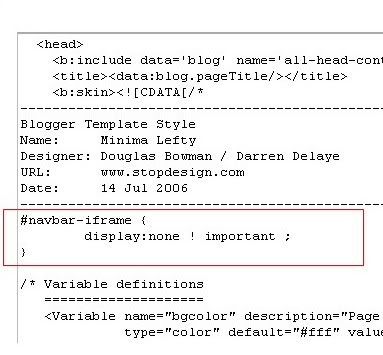
2.Next,click the edit html tab as shown in the below picture.


3.Add the below html code as specified in the below picture.


#navbar {
height: 0px;
visibility: hidden;
display: none;
}


4. Save the changes.

Now, you can see your blog without that navbar(this tip can only hides the navbar,it doesn't completely delete it).If you want the navbar to appear again,just remove that code and save the changes.
If you have any doubts,regarding this post,don't hesitate to ask.You can ask your doubts via comments to this post.

As a new blogger(webmaster),it is always interesting to know how many people are visiting your blog/site,pageviews,where they are coming from,which sites are referring,how many are coming via Search Engines(google,yahoo,etc) and what they are typing in the search engines to visit your site.
These stastistics are very handy interms of improving your blog and it is for FREE

If you search the google,you will find hundreds of sites which will track the visitors of your blog/site.But,some sites will provide more information about your visitors than the others.So,how to do this?

Here are the best tracking sources interms of the feautures they provide.


Note:One thing is common for all the tracking sites.First you need to register,and provide the necessary information about your blog/website.Next,they will give you a html code and you have to embed it in your blog.

How to do that in blogger?

1.Sign in to your blogger dashboard.

2.Click on the 'layout' link next to your blog name.

3.Click on the "Add a Page element"

4.Select "html/javascript" and past the code they provide and SAVE THE CHANGES.


From then,your blog will be tracked and you can check your blog stats from time to time after logging in to your registrate's website.


So,here are the good ones:-


Sitemeter.com:This one is one of the Most Popular tracking source.This is as simple as 123. Just create an account,copy the code from your account and paste it in your blog as suggested above

You have also the option to keep your blog stats PRIVATE.

They will give you the stats on how many pageviews(hits) per day,unique visitors,geolocation of the visitors,how many users online,and much more...As it is simple(not much animation),you site will load as fast as it is before.Stats are updated hourly.

You can setup a Free Account here


Histats.com:Unlike the Sitemeter which is very simple, this site will have very cool and animated counters.

Tracking is updated every 5 minutes.I personally using this site for my blogs.Like Sitemeter,this is also have the option to keep your site stats PRIVATE.

They will provide Animated graphs about your site visitors and fully animative.

You can register with them here


Statcounter.com:Same here!As in the name,it is a stats counter.It is fast,free,and quick loading.Invisible tracking is available and no ads on your site.All the stats are in real time and super fast.It is not much animated as histats.com.They will provide pageviews,unique vistors,visitors activity,search engine wars,keyword analysis,and many more..
Register a free counter for your blog here

As you can see below,I just created an article on How to track your blog visitors? and this is what I got when I typed the url of this article in Google after just posting the article.Wow! as you can see below,google crawled it in just 1 minute.I know there are so many out there waiting days and days for google to crawl their websites/blogs and I wondered how fast is google crawling this site!Write an article and check how much time it is taking for google to crawl your blog and share your comments here.


FASTEST WAY FOR GOOGLE TO CRAWL YOUR BLOG:


UPDATE:
And even better........look at this!